Showing posts with label Computing and Technology. Show all posts

Monday, July 11, 2011

Computer Security, Ethics, and Privacy


Information Theft

Everyone would be familiar with information theft. Information theft is a scary issue for not only individual but also companies, organizations, and universities. You can be stolen important information such as, email password, bank information, and social security information.

In April 2006, University of Texas, Austin was attacked and downloaded personal information of 197, 000 students, alumni, and employees by hacker according to the article “Defending Your Identity” written by Robert Lemos of PC Magazine. Even though the rate of identity theft occurrence is becoming high, there is no way to avoid it. As long as we are accessing to the internet, it is sure that you may face cybercriminal.

Identity thefts are occurred on both online and paper. So it is important not to throw simply your bank statement, old bill, and financial records. To defend identity, Robert Lemos recommends getting annual credit reports from three major credit bureaus by enrolling one of the following
  1. Security Blankets, www.annualcreditreport.com
  2. IdentityGuard, www.identityguard.com
  3. Lifelock, www.lifelock.com
  4. MyFICO Identity Theft Security(FairIssac), www.myfico.com/Products/IDF/Description.aspx
Scott Raymond of ZDNet mentioned that accessing to the internet is running the risks. Most of the people know the danger of information theft but don’t for protection. It is possible to access remote until you cut off accessing to the internet by hackers. According to the US Department of Defense, successful network intrusion can be done using a rogue USB flash drive.

The reason that the cyber thieves are trying to capture your information are understood. So precaution is very important for all users. Opening email attachment file from the unknown sender is not recommended. It will be better staying away from porn web site. Make sure you always on the firewall even you don’t have hardware firewall, most of the operating system are included their built in firewall.

Scott Raymond stated that we need to be aware of social engineering which uses the human elements by hackers. Keeping password private is important. Avoid writing the password on the post-it note. Hackers can send you email including some website which is similar to your bank website by promoting something. Whenever you receive this kind of email, never type your bank information on before thinking twice. Otherwise they can access to your account. As the threat of information theft is dangerous, it is important not to forget to do the best to be safe, be careful, and be smart.

Sometimes, no matter how we are trying to do the things carefully, your personal banker can steal your bank information. According to the PC Word, one of the Bank of America center employees, Brian Matty Hagen stole the client information and tried to sell it for cash. Finally he pleaded guilty and he is going to face 30 years in jail and $ 1 million fine. This news alerts us to check our credit report regularly as Robert Lemos mentioned above.

CNN reported that cyber self-defense must be practiced actively. If you run automatic software updates, maintained up-to-date antivirus software, you can be safer from cyber-threats and cyber-attacks

As U.S economy and component of the U.S. government is all depended on networked information technologies, Federal government’s cybersecurity is very important. The more dependencies grow, the greater cyberattacks occur. So, the intelligence community has taken an essential role in cybersecurity.

References
Shelly, Gary and Misty Vermaat. Discovering Computers 2010. Boston: Course Technology, 2010
PCmag. (2006, June 21). ”Defending Your Identity.” Retrieved September 19, 2010 from http://www.pcmag.com/article2/0,2817,1978634,00.asp
ZDNET. (2010, August 27). “Personal Computer Security: Using Uncommon Sense.” Retrieved September 19, 2010 from http://www.zdnet.com/blog/perlow/personal-computer-security-using-uncommon-sense/13878?tag=content;search-results-rivers
CNN Opinion. (2010, September 3). “Cyber self-defense can help U.S. security.” Retrieved September 19, 2010 from http://www.cnn.com/2010/OPINION/09/03/senators.cyber.security
PCWorld. (2010, June 7). “Bank of America Call Center Worker Pleads Guilty to Data Theft” Retrieved September 19, 2010 from http://www.pcworld.com/article/198263/


Sunday, September 19, 2010

Cloud Storage

Cloud Storage

As the increasing of the storage capacity trends, to have the best storage method is a vital issue of the company. Every outstanding company has been focusing on data back-up. Since they are doing that, there is no full trust in their storage device due to crashing hard drive for some reasons. Because of its benefits such as reducing expense and flexible way to access, cloud storage became a popular storage method or technology since 2009.

There are thousands of cloud storage providers on World Wide Web. It is pretty hard to say which one is the best as each technology brings each weaknesses and different strengths or fulfillments to the users. Some providers offer free access their server, some are on limited access, and some are required subscription fees. The lists of some cloud storage providers are as follow.


1. Dropbox
2. Sugarsync
3. ZumoDrive
4. GLADINet
5. Ubuntu One
6. Box.net
7. SpiderOak
8. ADErive
9. Amazon S3
10. Mozy.com
11. SDExplorer
12. Jungle Disk
13. Window Live Sync
14. SkyDrive


Before we make a decision to choose cloud storage, it will be better to know advantages of it. Hence, even though we know cloud storage reduces company expense, we are going to concern on our company privacy. As cloud storages are hosted by third parties, we cannot throw our full trust on them. Occasionally, the providers may undergo updating and maintaining their server. Meantime, we may face some problems such as difficulty in accessing server, poor bandwidth; and hardship in retrieving data. Additionally, cyber security is another issue. We could not say we or cloud storage will be never attacked by hackers and crackers.

Here, we would like to discuss on Dropbox and SkyDrive. Both of the companies are offering the best services to the user.

Dropbox
Dropbox is privately owned company. Dropbox provides 2GB of free online storage. Other op-tions include 50GB for $9.99 per month or $99.95 per year, and 100GB for $19.99 per month. These several options give us some chances to consider about the condition of our storage needed. We might not pay to enhance the capacity of storage space as long as we have enough one. There is no file size limit while you are uploading company data files. As we are diving deeply into the business environment, probably most of our advertising documents would be attached some heavy graphics file formats. There is no wonder the file size may large. So, unlimited file size in each uploading is a potential issue to focus on Dropbox. Although the storage capacity trend is high for the company, we can try 2GB using the free plan at the first stage. And then, we can see the benefits by observing time by time.

SkyDrive
There is no doubt everyone knows Microsoft. It was known publicly because of its dominating OS Windows’s series and Office Suite series. But less people know about SkyDrive. Here again, Sky-Drive is owned by Microsoft. We can get 25GB of online storage space without any charges. Using Sky-Drive is very simple. What you do is just create an account at site. Creating folder and uploading files to it may vary depending on how you can manage your cloud storage. We can know definitely the meaning of simplicity by using SkyDrive. There are some limitations. For example, 50MB per file for each uploading

After looking thoroughly, Dropbox is the better cloud storage company. Even though we have to pay for some, we can say it is much affordable price. Unlimited uploading file size is much valued to us.

By Zokhuva

References
Shelly, Gary and Misty Vermaat. Discovering Computers 2010. Boston: Course Technology , 2010
PC World. (2010, January 12). “Google Docs: Not the Only Free Cloud Storage in the Sky.” Retrieved August 28, 2010 from http://www.pcworld.com/article/186782/google_docs_not_the_only_free_cloud_ stor-age_in_the_sky.html
Associatedcontent from YAHOO. (2009, August 17). “The Advantages and Disadvantages of Cloud Computing. “Retrieved August 28, 2010 from http://www.associatedcontent.com/article/2052513/the_ ad-vantages_and_disadvantages_of_pg2.html?cat=15
PCMag. (2009, March 25). ”Dropbox.” Retrieved August 28, 2010 from http://www.pcmag.com/article2/ 0,2817,2343852,00.asp
PCMag. (2009, March 3). ” 5 Great Microsoft Web Services You Probably Don’t Use” Retrieved August 28, 2010 from http://www.pcworld.com/article/159413/5_great_microsoft_web_services_you_probably_ dont_use.html?tk=rel_news

Friday, August 13, 2010

Career Descriptions

In the age of Information Technology, web applications are widely used around the world. It is no wonder, all the software industries and software houses are trying to focus in web application. The numbers of web application programmer employed has highly increased. Sometimes web application programmer is called web developer. As they are posted as web application programmer, every individual of web application programmer must match certain qualification. To be a web application programmer, you must be able to analyze, design, develop, implement, and support web application and functionality. Some programming skills and multimedia knowledge are required to perform the above jobs. Specialized programming skills for web developer are HTML, XML, JavaScript, Java, C++, Perl, VBScript and multimedia knowledge includes such as Photoshop, Flash, Silverlight, and Dreamweaver.

Computer support specialist is called help desk specialist too. It is the good position to start as an entry-level in information technology fields. Basically, a help desk specialist solves the hardware problems, software problems, and some communication systems. Sometimes help desk specialist solve the problems in person and sometimes over the telephone. According to the various companies, help desk specialist needs to work evenings, weekends, or part-time

All the business organization no matter small or big that the organization is, they all rely on networks. So, Network Manager is an interesting career in information technology fields. Network Manager usually performs installing, configuring, and troubleshooting network system with the knowledge of local area networks and wide area network. Besides the technology skills, good oral and written communication skills are needed to be a network manager.

Programmer usually designs, writes, and tests the code. It is very important to have adaptable skills from one programming language to another. According to the software industries, the changes of technology will vary. So, the programmer must update their programming skills all the time.

As a new declared computer information technology student, I would like to pursue network manager focus because it is a kind of job mostly related to hardware rather than software. Even though the changes in technology are in both hardware and software, it is much easier to adapt the new hardware than learning the programming.

Reference
Shelly, Gary and Misty Vermaat.Discovering Computers. (2010). “Web Developer.” Retrieved July 31, 2010 from http://oc.course.com/sc/dc2010/index.cfm?action=learn&chapter=2
Shelly, Gary and Misty Vermaat.Discovering Computers (2010). “Help Desk Specialist.” Retrieved July 31, 2010 from http://oc.course.com/sc/dc2010/index.cfm?action=learn&chapter=3
Shelly, Gary and Misty Vermaat.Discovering Computers. (2010).” Network Specialist.” Retrieved July 31, 2010 from http://oc.course.com/sc/dc2010/index.cfm?action=learn&chapter=9
Discovering Computers. (2010). “Programmer” Retrieved July 31, 2010 from http://oc.course.com/sc/dc2010/index.cfm?action=learn&chapter=13


By Nicholas Pau

Thursday, August 12, 2010

Software Research

Microsoft Office 2010

As all users know, Microsoft is one of the biggest software companies on the world. It dominates all the PC hardware industry. We can see various versions of Microsoft Windows operating system in every PC. Here again, Microsoft Office 2010 is a well-known business software suite created by Microsoft. It was highly rated (4 of 5) by Jason Parker in the review article written on May 27th 2010 on www.cnet.com.

In CNet Editors’ review, for business and individual users who need professional level productivity apps, upgrading Microsoft Office 2010 is worthy. With Microsoft Office 2010, you can share your office works by using its web apps. A number of new features can save your time. Installation would be done within thirty minutes.

However, the update is not for everyone unless you are eager to try a new version. It will take time to learn a number of new features in every new version. It can cost you more.

Adobe InDesign CS5

The product of Adobe, Adobe InDesign CS5 is desktop publishing software. According to the reviews article by Matthew Murray written on April 12nd 2010 on www.pcmag.com, it was rated as “Very Good”.
In the review, the author states that Adobe InDesign CS5 is pretty much faster and easier than the previous version. Moreover, you can protect what you are doing by locking individual page elements. Adobe InDesign CS5 has so many useful tools that use in graphical designing and printing. They are easy to use. The amazing feature called Multithreading takes advantage the power of your computer’s multi-core processor.
Beside the advantages of Adobe InDesign CS5, still doesn’t have 64-bit support. To use the function, you must have a good knowledge of Adobe InDesign CS5.

References
Shelly, Gary and Misty Vermaat. Discovering Computers 2010. Boston: Course Technology, 2010
CNet. (2010, May 17).“Microsoft Office 2010.” Retrieved July 25, 2010 from http://download.cnet.com/Microsoft-Office-2010/3000-18483_4-75185041.html?tag=mncol#editorsreview
PCMag. (2010, April 12). “Adobe InDesign CS5.” Retrieved July 24, 2010 from http://www.pcmag. com/article2/0,2817,2362457,00.asp


By Nicholas Pau

Tuesday, August 3, 2010

Using the Companion Website

Using the Companion Website

After attending my first INFO- 1151 class, I have a chance to access online learning tools that I had not experienced before. To setup a member account, I typed in the URL “www.scsite.com/dc2010” in my Firefox browser address bar. I can see a little difference screen display from my course information book. Anyhow, I followed the step-by-step instructions. Finally, I was introduced to these learning tools in this exercise: Computer Genius, Crossword Puzzle, Practice Test, Quiz Yourself, Wheel of Terms, Key Terms, Chapter Review, Checkpoint True/False, Checkpoint Multiple Choice, and Checkpoint Matching. I realized that these are amazing learning tools.

Computer Genius is the tool I liked best. By spending time with it, I gained a lot of benefits from it. The instructions are clear and easy to understand. It is an exciting moment to hit the right or correct answer within sixty seconds. It is not only just a learning tool but also an entertaining game. I hope that it can lead me to become a real computer genius. Beside computer genius, “You’re hired” is the tool I liked least because it gave me such a boring time as well as hard time. Although the first two or three questions are easy to answer, the other remaining questions are pretty hard to guess the right answer.

The term or concept about application software is much familiar to me. But the “Convergence” is new to me. It is pretty hard to understand about this term with my knowledge coverage. “Convergence” term used to refer to the trend of manufacturers offering computers and devices with technologies that overlap. To know more, I tried to read about this term on page 18 again and again. I realized that this concept is least familiar to me.

By Nicholas Pau

Sunday, July 4, 2010

Gtalk Tips & Tricks

Gtalk nei lo, om lo phial ding. Ki nei kim tek. Ki zangh thei kim tek. "Gtalk na thei hia?" ci leng, "Zenzen" ong neu muh si cia ki ci kha ding. A lamdang thu ong hi nawn lo. A lamdang nawn lo Gtalk zangh ten, a lamdang pi khat aa, mi te zat theih zah sang, a tangzai pi tak aa, i zat theih na ding or i zat siam na ding deihsakna tawh Gtalk Tips & Tricks......

English-Zomi Dictionary( english2zomi@zodictionary.com )
Lawm te tawh ki ho kawm, laisim kawm, English-Zomi Dictionary na kisap ding leh, Gtalk ah english2zomi@zodictionary.com pen "Add" in. A "Add" zia pen, ki thei khin lua ding a hih man in, ong at nawn kei ning. Tua na "Add" khit ciang, english2zomi pen, ong "online" ding hi. Lawm dang te tawh ki ho/chat mah bang in, na theih nop peuhpeuh, khen suk le teh, ong dawng kik ding hi.

English-Burmese Dictionary ( en2mm3@mmgeeks.org )
Zomi khempeuh Media tawh ki pelh thei tuan lo hang aa, thu i theih nop leh Media tawh i ki zop ong kul tawntung hi. Theih nop thu khempeuh, Zolai in ki at gai lo aa, English or Burmese tawh a ki at te zong, i sim zel ong kul hi. Sangkah siamsin te aa ding, Dictionary ong ki sam hamtang in, zat nop i sak penpen i zangh tawntung hi. Gtalk zangh ten, English-Burmese Dictionary na deih ding vua leh, en2mm3@mmgeeks.org na "Add" un. A zenzen in, Burmese Font na neih kei leh, sikli nei bekbek ong suak kha ding a hih man in, hih mail a tawpna lam ah, "Font Installation Guide" na sim suak un.

English-English Dictionary ( dict@chatybot.appspotchat.com )
English bek mah nuam zaw, a khiatna ki tel khin zo zaw a ci te aa ding in, dict@chatybot.appspotchat.com pen na Gtalk ah na "Add" un. A zat dan pen, simple lua mahmah a hih man in, ong gen thuahthuah nawn dah ning. Ki Chat ding hi ziau lel.

English-Chinese Dictionary ( en2zh@bot.talk.google.com )
Zomi sung ah, Chinese pau/lai sin i om leh, English-Chinese Dictionary en2zh@bot.talk.google.com na "Add" in. Ki zangh thei mahmah kha ding hi.

SMS To Burma ( gtalk@etmsms.com )
Gtalk pan kawlgam SMS khak nop leh, gtalk@etmsms.com na "Add" in. A khak zia pen, SMS. Hih zong pen, a ki bawl khiat tun aa kipan, a hih zia ding, Zonet ah, ki khin a hih man in, hun bei sak in, ong at nawn dah ning.

Knowledge Bank ( webtoim@gmail.com )
Gtalk zat kawm in, theihnop khat peuhpeuh, thei velval nuam, i dot pak ding lah kua mah om pak lo cih dan peuh i om leh, webtoim@gmail.com na "Add" in. Na Gtalk ah ong "Online" ding hi. Tua ciang in, na theih nop ki dong thei hi. Dot zia ,,,,Who is the president of United States? , When was Microsoft founded? etc.

Health Calorie Count of Food Items ( calories@lifemojo.com )
Nisim nuntak na ding, i nek i dawn, ann leh tui ah, Calorie bang zah ki hel cih, i theih pakpak nang, hamsa hi. Medical Fields sung aa, nasem i hih kei buang aa leh, zong ki ngaihsun khol lo lai hi. A hih zenzen hang, tun Gtalk na theih nak leh, hih zong, a thei ta ding hi zel cei. Na Gtalk ah calories@lifemojo.com na "Add" in. Ong "Online" ding hi. Tua tak ciang, gentehna in, "Rice" cin khen ziau le teh, Calculation ong bawl semsem ding aa, "Rice" tawh kisai khempeuh ong kai khawm ding in, a Calorie pha zah ong gen kik ding hi.

Connect, Make Free International Calls ( phonenumber@talkster.gtalk2voip.com)
Phonenumber@talkster.gtalk2voip.com "Add" le hang, Gtalk pan, leitung mun tuamtuam free aa a ki call thei hi. Phonenumber cih na mun ah, "country code + area code+ phone number" teng a ki hel gai in, i ph. sap nop tek at ding hi hang. Lai mal gawm tawh "phonenumber" ci aa, at phei ding hi lo hi. A hi zong in, hih "Voip" ten, Dec 22nd 2009 khit zawh, service pia nawn lo in, Rebtel te tawh ki zom uh aa, tua pan zong, Account ki setup thei in, sap masak penpen Free Call ki ngah lai hi.

Local City Information ( asklaila@bot.im )
India sung aa om te aa ding hi. asklaila@bot.im na Gtalk ah na "Add" in. India gam sung aa, khuapi thupi, hotel thupi, mun thupi cih nengneng theih nop khat peuh peuh ki dong thei hi. Gentehna in, Mumbai khua aa, Movies lam tawh kisai bang a hih leh, "Mumbai Movies " cih khen ding.

Weather Forecast ( forecast@chatybot.appspotchat.com )
Mun tuamtuam aa om Weather Forecast thei nuam te aa ding hi. I Gtalk ah forecast@chatybot.appspotchat.com "Add" ziauh tawh, i om na mun ii khua hun Forecast nipi kal khat ai ding, a ki thei zo hi. Zat zia pen, i omna khua min, khen phot ding, tua khit ciang, a ma ong thuh kik ngak ding, ong thuh kik khit ciang, zip code khen kik ding. Zat nop mahmah hi.

Weather ( weather@chatybot.appspotchat.com )
Tuni khua hun bang ci ding, mei kai ven, guah a zu kha tam maw, cih ngaihsutna tuamtuam tawh, a pua pai khak ding sial lung buai thei i hi maw. Gtalk hong in, en pak ziau leng, nuam lo ding a hiam? Tua a hih leh, na Gtalk ah hih weather@chatybot.appspotchat.com na "Add" in. A zat zia pen, a tung aa, Weather Forecast mah tawh ki bang hi.


Shorten Uniform Resource Locator( surl@chatybot.appspotchat.com)
Hih pen thupi zong ki ci thei, thupi kei zong ki ci thei. A hih hang, khat peuhpeuh aa ding, phat tuam na khat a om khak ding leh, theih loh sang cih na tawh, ong at ingh. Internet i tut hun sung aa, i muh khak, a theih huai a thupi khat peuhpeuh, lawmdang te hawmsawn nuam, a URL Link email nuam ta, Copy tak mah leh, URL na sau lua,,,sau dendan mawk. Gtalk pan, neusek ni. Tua ma in, i Gtalk ah, hih surl@chatybot.appspotchat.com "Add" phot kul ding hi. A sawt lo aa, surl ong "Online" ding hi. Tua tak ciang, den-na URL Link a sau mahmah pen, Chat Box sung ah, Copy & Paste suk in, Enter mek le hang, URL Linke a tom no khat ong pia ding hi. URL pen Uniform Resource Locator a cih na hi.

Translation ( translate@chatybot.appspotchat.com )
Language khat pan khat ong translate sak ding hi. Na deih ding leh, na Gtalk ah, hih translate@chatybot.appspotchat.com na "Add" in. A zat zia pen, cih teng khen ding in, Enter mek ding. Gentehna, vi help cin kheng leng, Vietnamese tawh "help" ii lawh zia, ong translate ding hi. Language Code pen, a nuai aa dan hi.
Language Codes for Translation
AFRIKAANS af
ALBANIAN sq
ARABIC ar
BELARUSIAN be
BULGARIAN bg
CATALAN ca
CHINESE zh
CHINESE_SIMPLIFIED zh-CN
CHINESE_TRADITIONAL zh-TW
CROATIAN hr
CZECH cs
DANISH da
DUTCH nl
ENGLISH en
ESTONIAN et
FILIPINO tl
FINNISH fi
FRENCH fr
GALICIAN gl
GERMAN de
GREEK el
HEBREW iw
HINDI hi
HUNGARIAN hu
ICELANDIC is
INDONESIAN id
IRISH ga
ITALIAN it
JAPANESE ja
KOREAN ko
LATVIAN lv
LITHUANIAN lt
MACEDONIAN mk
MALAY ms
MALTESE mt
NORWEGIAN no
PERSIAN fa
POLISH pl
PORTUGUESE pt-PT
ROMANIAN ro
RUSSIAN ru
SERBIAN sr
SLOVAK sk
SLOVENIAN sl
SPANISH es
SWAHILI sw
SWEDISH sv
THAI th
TURKISH tr
UKRAINIAN uk
VIETNAMESE vi
WELSH cy
YIDDISH yi

Font Installation Guide

Zawgyi-One-20060620 pen hiah na Download in. Mun khat ah "Save". "Save" na mun/Folder ah pai, "Zawgyi-One-20060620" pen "Copy", tua pan, "Start" button pai leuleu, tua sung pan, "Control Panel" zong, "Control Panel" sung pan "Fonts" sung ah, den-na na Copy "Zawgyi-One-20060620" pen "Paste" ding. Fonts Window khak ding. Window Restart ding.
Start -> Control Panel -> Fonts -> Paste "Zawgyi-One-20060620"-> Close Fonts Window -> Restart Window

Gtalk hong leuleu, "Settings" sung pan, "General", "General" sung pan, "Change Font" mek, tua teh, "Font" sung pan, den-na na Install thak , Font "Zawgyi-One-20060620" pen tel/Select ding in, OK mek ding. "General" pan OK mek leuleu ding.
Settings-> General -> Change Font -> Zawgyi-One-20060620 -> OK -> OK

Saturday, June 12, 2010

Facebook Tips Seven

by Consumer Reports Magazine
Wednesday, May 12, 2010


Thu Masa

It Sanggam ulenau te khempeuh, hun khan' to na tawh ki zui in, Computer & Internet a tawm a tam, ki su kim ta hi. Computer leh Internet zat na tawh ki zui in, khat leh khat thei'h khak sunsun te ki hawm sawn, ki khak sawn zel aa, thu tampi ki thei khawm hi. Tua mah bang in, Social Website tuamtuam te ah zong account nei tek hi hang. Email zangh khempeuh phial in, nei'h lo thei'h lo zah phial in, i nei kim hi. Web Services a ki ci, ki hawp sawn na ii, manphat na khat hi in, khan' to na khat mah hi. Thei'h na te ong tam tak ciang in, thei'h khak lo' a lau huai, a ki dawp huai zong, ong tam kha thei hi.

Consumer Reports Magazine pan Wednesday, May 12, 2010 ni aa, ong pulak uh a hi, "7 things to stop doing now on Facebook" Facebook zangh te khempeuh aa ding, ong hawmsawn nuam ingh. A diakdiak in, mun tuam gam tuam tung, Bank/Credit Card nei, Facebook zangh te aa ding, thei'h sak nop na, deihsak na hi.

Facebook Tips Seven

1. Using a Weak Password
2. Leaving Your Full Birth Date in Your Profile
3. Overlooking Useful Privacy Controls
4. Posting Your Child's Name in a Caption
5. Mentioning That You'll Be Away From Home
6. Letting Search Engines Find You
7. Permitting Youngster to Use Facebook Unsupervised

Using a Weak Password

Dictionary sung aa om, words te leh thei'h baih ding min te password ding aa koih lo ding. Laimal gol leh neu, numbers leh symbols cih te i helh kei buang aa, a tawpna ah, no.(1,2 etc) cih te i hel hang, muan huai tuan lo hi. Password pen, a tawm pen mal 8 pha leh hoih hi. A hoih ding ah, laimal kikal ah numbers or symbols te helh zo leng hoih hi. Gentehna in, "horses" : hO27rsEs !

Leaving Your Full Birth Date in Your Profile

Identity thieves te aa ding, hoih khia lua mahmah hi. Identity thieves i cih pen, i tangthu thupi tuamtuam a ong guk sak thei, Computer siam te hi. Hih i D.O.B tawh i tangthu kan thie'h nang, information te ong kai khawm thei ding aa, a tawp na ah, i Bank Information te ong muhsak ding aa, Bank Account tuamtuam leh Credit Card Account te, ong zatsak sim thei ding hi. Na D.O.B na koih khak zenzen leh, na Profile Page aa, Info tab pen, na Mouse tawh Click in la, Edit Information sung aa, Basic Information Section ah, "Only the month and day or no Birthday at all" cih khat zawsang tel in.

Overlooking Useful Privacy Controls

A hih thei'h nak leh, na Facebook profile sung aa thu khempeuh, et thei'h muh thei'h ding, lawm te, lawm sawnsawn(lawm te lawm) or nang bek cih dan in, Limit Access bawl le cin hoih hi. Adang tampi lak pan, Photo, Birth Date, Religion Views, Family Information cih te,(Restrict Access) et ding phal leh phal lo' nei leng hoih hi. Restrict Access cih tak ciang in, pawl khat te phal, Photo cih te pawl Groups Access aa koih or pawl khat te Block cih dan hi. Mi khempeuh thei'h ding a hoih khol lo or i deih khol lo' ,Contact Info a hi, phone number, Address cih te pawl suahsak leh suahsak lo ding ngaihsut huai hi.

Posting Your Child's Name in a Caption

Photo tags or Captions cih te ah, na ta te min suan lo' ding hi. Midang khat peuhpeuh in, a na suan sak aa leh, "Remove Tag" Click in la, Delete in.

Mentioning That You'll Be Away From Home

"no one's home" cih dan aa, inn aa om lo ding, pulak na dan koih lo ding.

Letting Search Engines Find You

Na theih ngei lo khat peuhpeuh in, na Facebook account ah Access thei'h lo'h nang, Facebook's privacy controls aa, Search Section ah, "Only Friends for Facebook search results" pen, Select in. Public Search Results pen, "Checked" na piak lo' ding thupi mahmah hi.

Permitting Youngsters to Use Facebook Unsupervised

Facebook pen, members ding kum 13 pan a tung siah ki cian tan hi. A hih hang in, kum 13 nuai tampi in zangh lel hi. Innkuan sung ah, kum tawm lai naupang Facebook zangh na nei'h leh, Contact Information ding in, na email address pia in. Tua hi leh, Notifications tuamtuam et sak thei ding, Account Activities te limtak aa, ki Moniter/kemcing thei ding hi..

"What they think is nothing can actually be pretty serious," says Charles Pavelites, a supervisory special agent at the Internet Crime Complaint Center. For example, a child who posts the comment "Mom will be home soon, I need to do the dishes" every day at the same time is revealing too much about the parents' regular comings and goings.

By Nicholas Pau

Sunday, May 2, 2010

IE nasepzia hatsak semsem nuam.!


Internet Explorer nasepzia hatsak semsem nuam!
-------------------------------------------------------------------------
Browser Cache Size
"Cache" i cih pen, Internet i zat sial aa, i web page et te om na, Server pan, Browser Software ten, a ki tangsam "Computer Files" te, a manlang leh, a ol tak aa, zat kik theih zel nang aa, Hard Disk sung ah, mun khat bawl aa, a ong kep sak "Temporary Internet Files" te hi.

Browser Software pawlkhat
Windows Internet Explorer
Mozilla Firefox
Apple Safari
Google Chrome
Opera

A cache (pronounced CASH) is a place to store something temporarily. The files you automatically request by looking at a Web page are stored on your hard disk in a cache subdirectory under the directory for your browser (for example, Internet Explorer). When you return to a page you've recently looked at, the browser can get it from the cache rather than the original server, saving you time and the network the burden of some additional traffic. You can usually vary the size of your cache, depending on your particular browser.

Cache sizes, 100 megabytes sang a tam zaw pen, Computer sung ah mun tam la lua a hih man in, i Computer nespzia ong zekai sak hi. Cache sizes 10 megabytes sang a tawm zaw te lah, "Temporary Internet Files" te, Browser Software ten, ong kepsak nang, a mun ding cing zo lo zel a hih man in, "Network Activity" khan kul in, Computer nasepzia ong thanem sak leuleu hi.

"PC Pitstip Optimize 3.0" cih Registry Cleaner in, connection type tungtawn in, ong puah phat sak thei hi. Tua Software pen, "Full Features" ding, lei kul hi. Tua lo tawh, ei leh ei in zong, a nuai aa bang in, ki "Adjust" thei hi.

1).Internet Explorer hong ding!
2)."Menu bar" tung pan, "Tools" pen mek/Click
3)."Internet Options" pan "General" tab ah
4)."Settings" pen mek/Click.
5)."Disk space to use" cih na mun ah, 10 leh 100 megabytes kikal khat zaw sang khen/type!! eg.40, 50, 99, 100
6)."OK" mek/click.


By Nicholas Pau

Sunday, April 11, 2010

Gmail Zatzia

Gmail i cih pen, www.google.com pan, sum piak lo' Free aa i zat, web mail a cih na hi. Yahoo suakta tak aa, zat theih lo' na mun teng ah, thang mahmah hi. Kawlgam ah, ki nak zat pha diak hi. Tangzai toto in, ki ho thei'h na, Gtalk huhau in, muntuamtuam tung u le nau, lawm le gual cih te teng tawh, i ki holim khawm thei semsem. Bek tham lo', tun, i mel na ngawn zong, a ki mu thei hi ta.

Gmail Zatzia tawh kisai, lai i at lai tak, bang lo teng tawh, khin nai lo pi aa, na ki send kha ziau thei zel. Tua hi in, i send khit tak ciang, " aw, ki dok kik thei leh maw" i cih hun ong om thei. A ki send sa lah, i khak na te kiang, a na tung pahpah hi zel.

Tu-ni in, email i at sial, i send khit tak ciang, i khak na te kiang, a tun ma, i leh kaih kik thei'h nang, ong hawmsawn nuam ingh. A masa penpen, gmail hong ding. "Sign out" gei-aa, "Settings" mek ding. "Settings" sung pan, "Labs" mek ding. 13th na khawng aa, "Undo Send" pen, "Enable" option pia ding. Tua pan, tuaksuak suak ding in, a nuai pen aa, "Save Changes" mek ding.

Tun, lai na khak ding ciang, send na mek khit sial, a tung lam ah, "Your Message has been sent", "Undo", " View Message" cih te om ding hi. Thu kawng hei kik aa, i send sa, i leh kaih kik nop leh, "Undo" pen mek ding. "Aw, ki dok kik thei leh maw" i cih pen, tun i send sa, a kai khia kik, ci leng, a dok kik thei i hi ta ve.

"Undo" i mek man kei aa leh, tawm vei Gmail ten, hun ong piak thuah nang, "Settings" ah pai leuleu, "General" pen mek, khin suksuk ding, "Undo Send" gei aa, "Send cancellation period" cih na mun ah, Seconds behlap thuah ding hi lel.

By Nicholas Pau

Sunday, June 21, 2009

Gmail Tracking

Gmail tawh i email khak te, ki sim maw, ki sim lo?

Gmail address i thei'h leh, tua a nei pa/nu koi gam, koi mun pan cih ki kan thei hi. Tua ban ah, lai i khak ciang in, sim maw, sim lo cih zong, ki thei zo hi. Bang cih thei ding? Website nih i zat kul bek hi. I zat masak Website ding pen, Spypig a ki ci khat hi.

Browser tawh Windows a thak khat na hong in.( Internet Browser tawh kisai nung kal sung in, a ki cing in, ki kum khin i hih man in, tel khin tek ding hi hang. Tua ciang, laisim a tam zaw in, "Firefox ki nak zat zaw hi"cih thu zong, Pu Gin Mang in, Poll ong bawl na tungtawn in thei khin tek hi hang. Tu-ni aa, i sin ding te pen, Firefox zangh te aa ding bek, ong lem kha ding hi.)

http://www.spypig.com/ ah na pai in.

Windows a thak khat, na hong kik leuleu in la, na Gmail sung aa, Compose Mail mek/Click khit sa in, na koi'h kul ding hi.

Den-aa Spypig website sung aa, Step 1 Text box sung ah, na Gmail address na khen/type in.

Step 2 na ah, Subject/thulu ding khen/type.

Step 3, liim teng lak pan, khat tel in.

Step 4 na ah, 3 pen tel in.

Hih a tung aa teng man khit ciang, "Click to Activate My Spypig" a kici "Button" pen mek/click ding.

A nuai ah, sec.. tawh ong lak, liim khat ong dawk ding hi.

Tua liim sec 0 a tun ma in, na Gmail ii Body sung ah, Copy & Paste bawl in.

I e-mail khak sa te, i khak na ten, a sim khit uh ciang in, Spypig in, "na e-mail ki sim khin hi" cih thei'h sakna lai, i Gmail ah ong puak ding hi. Tua ong thupuak na sung ah, lai sim te ii, IP zong ki hel ding hi.( Internet Protocol)

Tun laisim pa/nu in, i e-mail khak sim khin cih thu thei, a IP zong, a thei khin hi ta hang. Koi mun/koi gam pan cih i thei'h nang in,

http://www.ip2location.com/free.asp ah pai kul leuleu ding hi.

Tua website sung ah, IP Address khet/type na ding mun ah, den-aa, IP pen khen/type ding hi hang. Tun, tua nu/pa, koi gam/koi mun pan cih ong dawk ding hi.

Lai sim mimal kim, a tel siam ding in, Topa'n thupha ong pia kim ciat ta hen.

By Nicholas Pau

Saturday, June 6, 2009

E-mail Category

E-mail zangh te, zatzia picing semsem
A bei-sa kha, ong lut-sa mail, Inbox sung aa te, online man lo, en man lo, na sep tawh buai, hun bit buai, hun ngah sunsun, Cyber Cafe tut nang, $$$ nei lo.....kal 1, ..2, 3..4.. Wow... kha 1 ong pha ta...tung-kha 7, kha-sum, $$$ sang, a dang ngaihsun man lo, lungsim sung ah khat bek, "ZONET" mail Check nuam lua ta, en nuam lua ta, thei nuam lua ta....nitak-lam, Net lam tai, lut suk, tu suk, zusano tawh IE mek, log on... Wow...Inbox(1256)..bang cih sim zawh peuh mah ding..?... "hih peuh mah ka siang-suah kul ding hi" kei leh kei ki ci. Check All, Delete ...bei hiau...lawmlegual te ong mail khak te lah bei, innkuanpih te ong mail te lah bei, groupsmail tuamtuam pan aa te lah bei, a thupi hon khat bei, vai tampi ki-pelh, gi-na lo, ki-cian lo, ciampel tang mawk.....!

A thei lo kei, a thei ding, world wide web ZOMI, IT VEKPI, tu-ni, email ong lut limlim teng khempeuh a nam in khen in, Inbox sung hi nawn lo, a ma nam tek ah, ong lut thei'h nang, ki-kum ni. Tua hi leh, a tung aa, kei tuah bang aa, Inbox(1256) cih bang ong hi nawn lo ding in, i et phet aa, Innkuanpih te kiang pan, mail bang zah? lawmlegual ten bang zah? ..etc ki thei pah lian ding hi. Tua lo i thei'h ngeilo', a dang tuamtuam email te bek, Inbox sung ah na om ding aa, a thupi lo, a ki sam lo te, ol tak aa, Delete ziau ziau thei ding hi hang. A nam/type cih ciang, ong tel hak zel in cin, gentehna in cih suk pahpah ni...Folder..Innkuanpihte, Lawmlegual, Zonet, cih bang in, Folder bawl phot ding hi hang, tua khit tak ciang in, innkuanpih te ong khak a hih leh, Innkuanpihte sung ah lut ding, tua mah bang aa, Lawmlegual, zonet cih mail te zong, a mun san tek ah, i dei'h dandan aa, Set-up ding hi hang.

Set-Up ding i cih ziau mawk, email khat leh khat ong ki bang lo, ki ngah ding ai maw.? Ki-ngah mah hi.

Tulaitak, gamsung gampua pan, ki ho na ding aa kipan, a lem pen, Gtalk, Gtalk nei khempeuh in, gmail or googlemail nei, hih gel a ki bang...! yahoo zangh te, rocket mail leh ymail a ki ci teng ki bang leuleu..hotmail,msn leh live ki bang. A masa penpen gmail pan, pan ni.

Gmail or Googlemail

1).Sign in (na email hong ding)
2).Click "Settings " (na email window sung, a tung taklam, a 4th ni ah om ding hi)
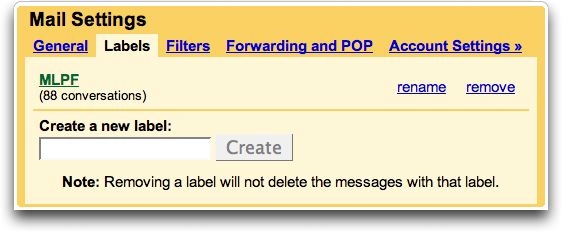
3).Click "Labels" (Settings menu sung aa, veilam pan, a 3rd na ah)
4)."Create a new label" a kicih na mun nuai ah, i folder/label bawl nop min khen/at ding. Gttn : Zomi(Zonet mail) khen/type ding.
5).A gei aa, " Create" pen mek or Click leuleu.
6).A tung aa, No.4 na mah bang aa, a dang i bawl nop folder/label min ding teng khempeuh bawl toto ding Gttn: Innkuanpihte-Family, Lawmlehgual-Friends, Thutuamtuam-Information ..etc... Folder/Label teng khempeuh i bawl khit ciang..
7).Click "Filters"( "Labels" ii a zom hi pah lel)
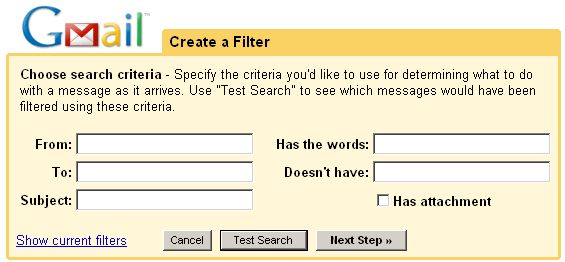
8).A nuai aa, " Create a new filter" a kici pen Click leuleu..
9).Tun, Zonet mail teng khempeuh, Inbox sung lut nawn lo ding in, Zomi(Zonet mail) den-a i bawl Folder sung ah Direct aa, a na lut thei'h nang aa, a bawl ding hi ta maw. It Vekpi thei'h sa mah hi ta ven...khat vei ki gen pha kik leng, Zonet pan ong lut mail khempeuh pen, Subject mun san ah i Net pute, a na set up uh a hi,"[ZONET]" a kici om hamtang hi ven maw...OK..."Create a filter" nuai a taklam ,"Has the words:" a kici gei aa, lai at thei'h na "Text Box" sung ah, [ZONET] ci'n at phei ding. a dang bang mah at kul lo lel.
10).Click " Next Step" Check Box tampi ong om ding hi.
11)."Skip the inbox" a kici pen, Check pia ding(Mouse tawh khat vei Click).
12)."Apply the label:" pen, Check pia leuleu, a gei aa, " Choose label" ah, Zomi(Zonet mail),den-a i bawl pen, Select/tel ding.
13)."Create Filter" button pen Click ding. Tun, Zonet mail teng khempeuh, Inbox sung lut nawn lo ding aa, i Special Designed Folder/Label a hi, Zomi(Zonet mail) sung ah, ong lut ta ding hi.

Innkuanpihte kiang pan aa, mail te, "Innkuanpihte-Family" cih dan aa, i bawl nop ding leh, Folder/label min ding pen, i deih dandan hi in, a tung aa bang in, kibawl thei ding aa.. Gttn: zuapa@gamail.com, tunnu@gmail.com, ciinlaizom@gmail.com, tuailaizom@gmail.com etc.. Nulepa Sanggam Ulenau te mail teng khempeuh, " Innkuanpihte-Family" sung ah, Direct aa, lut sak nuam ..

1).Click "Create a new filter"
2)." From" gei aa, "Text box" sung ah," zuapa@gmail.com " khen/type.
3)."Skip the Inbox" leh "Apply the label" pen Check(Mouse tawh khat vei Click),.
4)."Apply the label" gei aa, "Select the label" mun san, den-aa i bawl, " Innkuanpihte-Family" cih pen Select.
5)."Create Filter" button pen click.
6).Tua mah bang in, tunu@gmail.com, ciinlaizom@gmail.com, tuailaizom@gamil.com etc cih teng leh, sanggam ulehnau mail address teng khempeuh, No.1 pan No.5 dong, step by step in ki bawl thei toto ding hi.

Information tuamtuam leh, a dang Folder/Label tuamtuam i bawl nop lai leh zong, bawl zia, a ki bang hi lel.

Hi It Vekpi, the last of the last, na email deihlo or, na sim nop lo or, ong lut ding na deihlo email te, Automatically in, na Delete nuam dia...!!! Ok na lunglut leh...
1).Click " Create a new filter'
2).E-mail address na thei'h leh, " From" mun san ah, "email address" or
3)."Subject" mun san ah, min deih lo velval om ci pak ni.. Gthna.."Than Shwe", "Meitei" or C...n gentehna bek a hi maw IT VEKPI... tua na deih lo words te, " Has the words" cih na mun gei ah, khen/type le cin, na man ciang,
4).Click " Next Step" .
5)."Skip the Inbox" leh " Delete it" Check box te gel, Check(Mouse tawh khat vei Click).
6).Click " Crete filter' button.

Hotmail leh yahoo zangh te aa ding, mailam ah, ki kum lai ni.

By Nicholas Pau

Monday, June 1, 2009

PC Lei-zia Ding

Computer lei-nuam te, i lei-ma in, a thei'h huai, thei'h khak sunsun pawlkhat, thei'h man hi lo, thei'h sak nop man bek mah tawh, world wide web Zomi, it vekpi tung, ong pulak nuam ka hih man in, a thei khin sa zong om kha ding hi hang. A hi zong in, a thei khin sa te aa ding in, " A person who graduates today and stops learning tomorrow becomes uneducated the day after." na kici a hih man in, a thei nai lo te aa ding, bulphuh tentan in, a nuai aa bang in, kong post khia mai hi.
Computer pen, a thak khempeuh hoih zaw tuan lo, a lui khempeuh, hoih khin lo tuan lo a hih man in, a lunglut ten, a nuai aa te en in, hih thudotna 2 ei leh ei or nang leh nang, ki dong phot le hang hoih ding hi.,
Ka Budget?
Ka Computer lei nop, bang lian aa, zat ding?(email & internet, DTP, Media ...etc...)
Amasa penpen in, Processors(CPUs) , Memory(RAM), Hard Drives, Optical Drive, Video Card, Monitor te thupi masa pen hi.

Processors( CPUs)..."AMD" leh "Intel"
"Cores" leh a zawhna "speed".....cih thu 2 tung ki-nga hi.
Outdated Processors
AMD Athlon 64 ( Non Dual Core/ *2 Models)
AMD Athlon 64 X 2 ( Older Socket DDR)
AMD Athlon XP
AMD Athlon * 2 BE-2350 to BE-2400
AMD Duron
AMD Sempron
Intel Celeron
Intel Celeron D
Intel Pentium 4
Intel Pentium D
Intel Pentium III
All VIA Processors

Budget Processors
AMD Athlon 64*2 5600 + Higher (Socket AM2/AM2+)
AMD Phenom X3 8450 and Higher
AMD Phenom X4 9650 and Lower
AMD Phenom II X3 710 and Higher
AMD Phenom II X4 810

Intel Core 2 Duo E7200 and Higher
Intel Pentium Dual-Core E5200 and Higher
Middle Processors
AMD Phenom X4 9850 and Higher
AMD Phenom II X4 920 and Higher
Intel Core 2 Duo E8400 and Higher
Intel Core 2 Quad Q8200 and Higher
Intel Core 2 Quad Q9300 to Q9650
Intel Core i7 920 to 940
Top of the line Processors
Intel Core 2 Extreme QX9650 and Higher
Intel Core i7 Extreme 965

Best Processors
AMD Performance-Phenom 9850 Black
Intel Performance-Core2 Extreme QX9775
AMD Value-Phenom 9850 Black Edition
Intel Value-Core2 Duo E8500
AMD Budget-Athlon 64X2 6000+

Memory(RAM)
RAM tulaitak a kizang lian pen DDR2 leh DDR3,(DDR: Double Data Rate)
OS leh Software tuamtuam zatnop tungtawn in, RAM a tawm, a tam ki sam hi.(OS: Operating System). Minimum 1GB, Optimal 2GB, Smooth Sailing 4GB
RAM 4GB aa ding, 64-bit OS kisam hi.
RAM(slowest to fastest)
DDR2 400 MHz or PC2-3200
DDR2 533 MHz or PC2-4200
DDR2 667 MHz or PC2-5300/PC2-5400
DDR3 800 MHz or PC3-6400
DDR2 800 MHz or PC2-6400
DDR3 1066 MHz or PC3-8500
DDR3 1333 MHz or PC3-10600/PC3-10666
DDR3 1600 MHz or PC3-12800

Hard Drives
Hard Drives/Hardisk pen Brand tam mahmah a hih man in, GB a tam theithei, RPM a tam theithei pen, a hoih hi pah hi.(GB: Gigabyte,109 or 1,000,000,000 bytes IEC, RPM: Revolutions Per Minute)..Computer i zatnop na tung tawn pan, Hard Drives nam i et tak ciang in,
Word Processing: 250 + GB, 7200 rpm
Web Surfing: 250+ GB, 7200 rpm
Light Gaming: 320+ GB. 7200 rpm
Heavy Gaming: 500+ GB, 7200 rpm
Digital Music: 750+ GB, 7200 rpm
Graphics Editing: 750+ GB, 7200 rpm
Digital Video: 1TB+, 7200 rpm

(TB: Terabyte, = 1012, or 1,000,000,000,000, bytes 1012, by IEC: International Electrotechnical Commission)
Optical Drive
Drive Types: CD, DVD leh BD
CD leh DVD aa ding
Samsung SH-S223Q
HP DVD 1070i
Samsung SH-S223F
LG Electronics GH 22LS30
Lite-On iHAS 220-08
BD
Pioneer BDR-203
LG Electronics GGW-H20L
LG Electronics GGC-H20L
ASUS BC-06B1ST
(CD: Compact Disc, DVD: Digital Versatile Disc or Digital Video Disc, BD: Blu-ray Disc)
Video Card
Budget
EVGA GeForce 260 GTX Core 16 896MB
Sapphire Radeon HD 4870 1 GB
XFX GeForce GTS 250 1GB Core Edition
Sapphire Radeon HD 4850 512MB
Sapphire Radeon HD 4770 512MB
Galaxy GeForce 9600 GT Overclocked 512MB

Best 3D
BFG Tech GeForce GTX 295
Sapphire Radeon HD 4870 X2 2GB
Sapphire Radeon HD 4850 X2 2GB
EVGA GeForce GTX 285 SSC Edition
Sapphire Radeon HD 4890 1GB

Monitor
Acer X233Wd 22-inch
HP LP2275w 22-inch

ASUS VW224U 22-inch
Samsung ToC T220HD 22-inch
NEC Multisync P221W-BX-SV 22-inch

Ref: Internet

By Nicholas Pau

--------------------------------------------------------------------------------

Tuesday, March 24, 2009

Third-Level Domain

Third-Level Domain

Third-level domain names pen Second-level Domain,a nei Company te kiang pan,phal na tawh a ki bawl thuah thei hi in,i zat nopna tungtawn in,ki lam dang hi.web page a hi zong,email a hi zong,web page khen neu khat a hi zong,a tuamtuam in,ki bawl thuah thei hi.Gttn:www.multiply.com website pan,na min tawh,personal website na bawl nop leh ki ngah aa,web address pen,www.namin.multiply.com cih bang aa,ong suak ding hi.A nuai aa ”www”,”mail”,”groups” te pen Third-level domain name hi pah hi.
(Gttn:www.yahoo.com, mail.yahoo.com, groups.yahoo.com).Third-level domain khit teh, fourth -level leh a tung siah zong ki bawl thei lai in,sub-domain zong ki ci hi.

Country Domain

Leitung gam khempeuh in,a mau gam min (a tom lak),domain min nei tek uh hi. Gttn:www.myantel.net.mm , “ mm” pen Country Domain name(min) hi in,Myanmar(Kawlgam) a cih na hi.Leitungbup aa gam khempeuh Country Domain ,alphabetically in,a nuai aa bang hi.

List of Country Domain

Country Domain Gam Min
A
.ac Ascension Island www.ascension-island.gov.ac
.ad Andorra www.andorra.ad
.ae United Arab Emirates
.af Afghanistan
.ag Antigua and Barbuda
.ai Anguilla
.al Albania
.am Armenia
.an Netherlands Antilles
.ao Angola
.aq Antarctica
.ar Argentina
.as American Samoa
.at Austria
.au Australia
.aw Aruba
.ax Aland Islands
.az Azerbaijan

B
.ba Bosnia and Herzegovina
.bb Barbados
.bd Bangladesh
.be Belgium
.bf Burkina Faso
.bg Bulgaria
.bh Bahrain
.bi Burundi
.bj Benin
.bm Bermuda
.bn Brunei
.bo Bolivia
.br Brazil
.bs Bahamas
.bt Bhutan
.bw Botswana
.by Belarus
.bz Belize

C
.ca Canada
.cc Cocos(Keeling( Islands
.cd Democratic Republic of the Congo
.cf Central African Republic
.ch Switzerland
.ci Cote D'Ivoire(Ivory Cost)
.ck Cook Islands
.cl Chile
.cm Cameroon
.cn China
.co Colombia
.cr Costa Rica
.cs Serbia and Montenegro
.cu Cuba
.cv Christmas Island
.cy Cyprus
.cz Czech Republic

D
.de Germany
.du Djibouti
.dk Denmark
.dm Dominica
.do Dominican Republic
.dz Algeria

E
.ec Ecuador
.ee Estonia
.eg Egypt
.eh Western Sahara
.er Eritrea
.es Spain
.et Ethiopia
.eu European Union

F
fi Finland
.fj Fiji
.fk Falkland Islands
.fm Federated States of Micrones
.fo Faroe Islands
.fr France

G
.ga Gabon
.gd Grenada
.ge Georgia
.gf French Guiana
.gg Guernsey
.gh Ghana
.gi Gibraltar
.gl Greeland
.gm Gambia
.gn Guinea
.gp Guadeloupe
.gr Greece
.gs South Georgia and the South Sandwich Islands
.gt Guatemala
.gu Guam
.gw Guinea-Bissau
.gy Guyana

H
.hk Hong Kong
.hm Heard Island and McDonald Islands
.hn Honduras
.hr Croatia
.ht Haiti
.hu Hungary

I
.id Indonesia
.ie Ireland
.il Israel
.im Isle of Man
.in India
.io British Indian Ocean Territory
.iq Iraq
.ir Iran
.is Iceland
.it Italy

J
.je Jersey
.jm Jamaica
.jo Jordan
.jp Japan

K
.ke Kenya
.kg Kyrgyzstan
.kh Combodia
.ki Kiribati
.km Comoros
.kn Saint Kitts and Nevis
.kr South Korea
.kw Kuwait
.ky Cayman Islands
.kz Kazakhstan

L
.la Laos
.lb Lebanon
.lc Saint Lucia
.li Liechtenstein
.lk Sri Lanka
.lr Liberia
.ls Lesotho
.lt Lithuania
.lu Latvia
.ly Libya

M
.ma Morocco
.mc Monaco
.md Moldova
.me Montenegro
.mg Madagascar
.mh Marshall Islands
.mk Republic of Macedonia
.ml Mali
.mm Myanmar
.mn Mongolia
.mo Macau
.mp Northern Mariana Islands
.mq Martinique
.mr Mauritania
.ms Montserrat
.mt Malta
.mu Mauritius
.mv Maldives
.mw Malawi
.mx Mexico
.my Malaysia
.mz Mozambique

N
.na Namibia
.nc New Caledonia
.ne Niger
.nf Norfolk Island
.ng Nigeria
.ni Nicaragua
.nl Netherlands
.no Norway
.np Nepal
.nr Nauru
.nu Niue
.nz New Zealand

O
.om Oman

P
.pa Panama
.pe Peru
.pf French Polynesia
.pg Papua New Guinea
.ph Phillipines
.pk Pakistan
.pl Poland
.pm Saint Pierre and Miquelon
.pn Pitcairn Islands
.pr Puerto Rico
.ps Palestinian territories
.pt Portugal
.pw Palau
.py Paraguay

Q
qa Qatar

R
.re Reunion
.ro Romania
.rs Serbia
.ru Russia
.rw Rwanda

S
.sa Saudi Arabia
.sb Solomon Islands
.sc Seychelles
.sd Sudan
.se Sweden
.sg Singapore
.sh Saint Helena
.si Slovenia
.sk Slovakia
.sl Sierra Leone
.sm San Marino
.sn Senegal
.so Somalia
.sr Suriname
.st Sao Tome and Principe
.su Soviet Union
.sv El Salvador
.sy Syria
.sz Swaziland

T
.tc Turks and Caicos Islands
.td Chad
.tf French Southern Territories
.tg Togo
.th Thailand
.tj Tajikistan
.tk Tokelau
.tl East Timor
.tm Turkemenistan
.tn Tunisia
.to Tonga
.tr Turkey
.tt Trinidad and Tobago
.tv Tuvalu
.tw Republic of China(Taiwan)
.tz Tanzania

U
.ua Ukraine
.ug Uganda
.uk United Kingdom
.um United States Minor Outlying Islands
.us United States
.uy Uruguay
.uz Uzbekistan

V
.va Vatican City
.vc Saint Vincent and the Grenadines
.ve Venezuela
.vg British Virgin Islands
.vi United States Virgin Islands
.vn Vietnam
.vu Vanuatu

W
.wf Wallis and Futuna
.ws Samoa

Y
.ye Yemen
.yt Mayotte
.yu Yugoslavia

Z
.za South Africa
.zm Zambia
.zw Zimbabwe

By Nicholas Pau

Internet for Beginner

Mihing te ii nuntakna ah,Computer leh Internet in mun ong la mahmah ta aa,mun khempeuh ah,Computer leh Internet zat dan ,theih loh a pha mawh thu khat in ong om ta hi.A hi zong in,mi tampi'n ,Internet pen,email lai-at/lai-khak nading ciang bek in,ngaihsun a hih man in, Internet ii thupi't na tampi a ki sup lawh hi.

Tua a hih man in,Internet ong pian' khiatna thu,a tom in,i theih khit teh,Internet picing tak aa, ii zat theih nading leh a zangh-siam te ih hih theih nading ki kum leuleu ni....

Amasa penpen in,Internet picing tak aa,ii zat theih nading van(Software) kisam pawl khat om aa,tua te lo tawh Internet ii zat dan picing thei lo hi.

Equipment Checklist(A kisam teng)

1.Computer and Internet Connection
2.Internet account with a connection provider
3.Internet browser software
4.Anti-virus software
5.Email software
6.Plug-in software
7.Optional: Stero speakers, microphone and webcam
8.Optional: Anti-spam software
9.Optional:Censorware
10.Optional: Printer

Computer and Internet Connection
I theih sa tek mah bangin,Internet ii et theih nang,a masa penpen in,Computer leh Network Connection(kizopna) kisam hi.Internet Connection pen Dial up,Broadband cih bang in om hi.Internet Cafe pan bel,i zat man,a nai tawh kipia in,ut tan vei leh zawh tan vei ki zangh thei hi.

Internet account with a Connection Provider
ISP(Internet Service Provider) zong ki ci hi.Gam sung ah,Myanmar Teleport(Bagan Cybertech) ten Internet service tuamtuam pia hi.Gampua lam ah, phone leh cable companies ten service pia aa, a kha in sum la uh hi.Gam khangto' zawdiak aa,Restaurant leh Hotel mun thupi ten,”Free Wifi” ci'n,a mau Customer(a ne a dawn,a giak) te ading service pia tuam uh hi.

Internet Browser Software
Internet Explorer(IE) ki zang pi pen in,version 6 dong om ta hi.Mozilla Firefox zong ki zang mahmah ta hi.Tua ban ah,AOL, Opera,Netscape cih te pen,a ki thei kim nai lo Browser Software pawl khat hi.


Anti-Virus Software
Computer khuak(brain) a su sia zo,a ki lawh thei natna(virus) tuam tuam te Internet tun pan a hih kei leh natna(virus) a om sa Computer pan Floppy,pendrive(memory stick),CD, cih te I zatna pan in ki ngah thei hi.Hih natna kidal nading in,Anti-virus software om aa,Symantec/Norton leh McAffee te hoih pen in,muanhuai pen hi.


Email Software
Microsost Outlook,Outlook Express,Eudora, Groupwise cih te pen mail Server tawh a ki zom Email software te hi.Tua te sang',Web mail(yahoo,gmail,hotmail etc..) te lem pen a hih man in,ki tam zat zaw hi.


Plug-in Software
Internet pan movies & animation tuamtuam et theih nading,music(la) tuamtuam ngaih theih nading leh ebooks(laituamtuam) sim theih nading,games(om-maih)theih nading in,hih plug-in Sofware te kisam mahmah hi.


What Plug-in I should have?(Bang teng neih huai)
1.PDF format(.pdf files)tawh a ki bawl/save lai thupi(files) te sim nading in,Adobe Acrobat Reader ki sam hi.Computer tawh a kisim laibu(ebooks) a tam zaw, PDF format vive hi. Internet pan latest Version(a hoih pen)a nuai aa,web address ah ki download(la-suk) thei hi.
http://www.adobe.com/products/acrobat/readstep2.html

2.Game(om-maihna)tuamtuam te tawh,Internet a zangh nuam te ading in,Java Virtual Machine kisam hi.Hih online Game te pen,Java Applets a kici Computer te teltheih kampau/lai(programming language) tawh a ki-at/bawl Software nam hi.Internet tung pan,na Computer ah,a nuai aa, web address pan, ki download(la-suk) thei hi.
http://www.virtualmachine.tk

3.SWF Format(.swf files)tawh a kibawl online Movies(Mel-muh-tong-san) tuamtuam te et theih nading Macromedia Flash Player kisam hi.
http://get.adobe.com/flashplayer

4.SWF Format(.swf files)mah tawh a kibawl/at heavy-duty movies(mel-muh-tong-san) et theih nading leh Game(om-maihna)nei nuam te a ding, Macromedia Shockwave Player kisam leuleu hi.
http://get.adobe.com/shockwave

5.RAM Format(.ram files) tawh a kibawl laa(songs)tuamtuam ngaih theih nading Real Audio Player
http://www.real.com/player

6.Movies & Music tuamtuam ettheih/ngaihtheih nading,Windows Media Player kisam hi.Computer a tamzaw ah,om khin hi.A om nai lo Computer a zangh ten zong,hih web address ah ki download(la-suk)thei hi.
http://www.microsoft.com/windows/windowsmedia/player

7.MP3 la(song)tuamtuam leh WAV Format(.wav files) music,nuam tak aa,ii ngaih theih nading Windows WinAmp kisam aa,hih pan ki download(la-suk)thei hi. http://www.winamp.com/player

8.Internet or email ii et laitak,ii zat lo',a kisam lo web page tuamtuam ama thu(automatically) aa,ong dawkdawk thei hi.”Pop-up Killer” a kici Software pawl khat tawh kidal thei hi.
http://www.stopzilla.com

9.File agik mahmah pawlkhat email tawh i khak(attach file) nop ciang,ki ngah lo hi.Tua bang aa agik/agol File te Winzip a kici Software tawh a neu theithei ding in,kikhep(Compress) thei aa,i dieh hun in,ki phel/zal(Decompress) kik thei hi.Gttn:VCD/DVD/CD khui khat peuhpeuh(ei lak tawm te bek) email tawh i khak nop ciang,Winzip tawh neusak in,email tawh attach file pan,ki khak thei hi.(Kawl VCD te Computer tawh ki en ngam lo hi.)
http://www.winzip.com/prod_down.htm

Stero Speakers, Microphone and Webcam
(Om le lah hoih sem,a om kei hang pha mawh lo!)
Instant Messenger a hi(Gtalk,AIM,Msn etc) te tawh phone i zat mah bang in,a gamla a nai pan ki ho thei hi.I ki ho theih nang,Microphone ki sam hi.Video Chat program a ki-hel Yahoo Messenger,Skype, VZO Chat etc.. cih te tawh ki ho thei bek tham lo in,i mel na ngawn zong i-ki ho lai tak ki mu thei hi.Tua bang aa,i mel/mai I ki muh thei'h nang,Webcam a ki-ci,Web Camera ki sam hi.


Anti-spam software
(Om le lah hoih, a om kei hang pha mawh lo!)
“Spam” ih cih pen,i email sung ah,i lawm,i gual,khuapih tuipih cih te email pan hi lo in,koi pan cih ki thei lo aa,ong lutlut email te hi.A tam zaw pen,Advertisement(pu-lak-theih-sak hawm khiat-na) tuamtuam hi in,i deih kei hang,ong lutlut thei hi.Ki sam lo pi-in,i email inbox sung dim cip mang thei hi.Hih mail te ong lut lo'h nang in,Yahoo mail zangh ten “Option” pan bawl thei aa,Google mail/gmail zangh ten “Settings” pan bawl thei ding uh hi.Software ngiat aa,a ki zuak zong om hi.


Censorware
(Om le lah hoih, a om kei hang pha mawh lo!)
Inn pan aa,Internet zom te a ding hi zaw hi.Kum cing nai lo,naupang ten,Internet a et uh ciang,lim hoih lo tuam tuam leh, a et huai lo Video(Mel-muh-tong-san)tuamtuam te a et thei'h lo'h nang' a kham ding Software hi.

Printer
(Om le lah hoih, a om kei hang pha mawh lo!)
Lai thupi tuamtuam lak khiat theih nading Printer kisam mahmah hi.Internet Cafe a tamzaw ah,Printer om hamtang a hih man in,gamsung aa Internet zangh te a ding in,ong senpi mahmah hi.


By Nicholas Pau

History of Internet


Leitung nuntakzia te ong khang to semsem in,mun tuamtuam ah,Computer leh Internet ong ki nak zat mahmah hi.Mun tuam,gam tuam,a gam la,a nai aa piang,thu cin,thu tang khempeuh,tha khat thu in(online),ki thei gai in,ki za gai pah hi.Tua ahih man in,leitung ih cih pen,GLOBALIZATION,khua no khat,a bang ong hi ta lel hi.

Kawlgam ah zong,2002 khit pawl aa ki pan,Cyber Café(Internet) tampi,mipi(Public)zat theih ding in,mihau sum bawl ten,ong hong ta uh hi.Tua hun lai in,Internet zat man zong,tam man lai a hih man in,mihau te bek mah in,zangh zo hi.Thu zong,ong thei zaw pah uh hi.Mi zawng te a ding in,a theih ngam huai lo thu khat in,ki tuat phial hi.Na hi het lo hi.Tu hun pen IT(Information Technology)hun a hih mah bang in,a kua mah khempeuh in,ih theih ding thupi mahmah hi.A diakdiak in Muizawl khangthak sung ah,IT Expert tampi ong piang khiat zawh na ding,kisam mahmah hi.

Tua a hih man in,tu-ni in,Internet tawh kisai,ong piankhiat na thu a tom in…..
Internet ih cih pen,leitung mun tuamtuam aa, Sumzonna(Business), Pilna(Education),Kumpi (Government), Gualnopna (Entertainment) ,Mihing kipawlna (Society), Thuthak (News).. etc… te tawh kisai thulehla kaih khop,hawm khiat na a hi,leitungbup lai mai khat hi.

Computer khat leh khat kizopna pen Network ki ci aa,kizop theih pilna pen(Networking) ki ci hi.Inn dei khat sung aa Computer tampi a kizopna pen LAN(Local Area Network)ki ci hi.

Tua bang in,a kizop theih tak ciang ,zum inn dei(Office Room) khat sung aa,Computer tampi ten, Printer(lai at sa te laidal tawh lak khiat theih na),Scanner(mann,lai,lim a om sa a hih bang lian aa,Computer sung ah guan kik na),Camera(lim lak na)cih te,ki zangh khawm thei hi.LAN..khat leh khat ong ki zop tak ciang in,ong tangzai semsem aa,WAN(Wide Area Network)ki ci leuleu hi.Network of Networks,Internet zong ki ci hi.

WAN,Internet pen 1969 in,USA gam aa,US. Defense Department te ARPANET project pan ong ki pan khia hi.ARPANET (Advaced Research Project Agency)ih cih pen Pentagon tawh kisai Research bawl te kipawl na khat hi.Computer kizopna(Network) tawh a kizom Computer khempeuh in,a zat theih gaih nading Centralized Control of Data Flow(mun khat pan,thu leh laa zek khiatna) pen,ARPANET te ngimna bulpi hi.

Damdam in,leitung mun tuamtuam aa om, kumpi (Government) leh sumzonna (Business) tuamtuam ten,Internet tung ah,thu leh laa ong khah khia uh hi.Pilna lam pan zong,sang(University)tampi ten,Intenet tung ah a theih huai thu te ong pulak in,mihing kipawlna tuamtuam ten zong,thuthak(News) tangko na in,ong nakzat mahmah uh hi.
Tu-hun-ciang in,a thei nuam khempeuh in,I theih nop thu khat peuhpeuh pen,Internet tung pan a baih tak in,ki mu thei ta hi.
Tu hun Sangnaupang ten,tampi tak hamphat lawh uh hi.Internet pen I zat siamna tungtawn in,pilna,hamphatna a ki ngah a hih man in,zat siam semsem,a ki hampha semsem ong suak hi.
Nuntak hamsat zia te,I ngaihsut khak tak ciang in,pilna lam bang mah ki lunggulh ngam taktak kha lo hi.,Khangthak mipil ding tampi zong,I sup lawh phial ta hi.Ngaih sun thei leng kha siat huai mahmah hi.Muizawl mimal sung ah zong,pilna lam a hanciam nuam mahmah khangno tampi om ding hi.Edison pen etteh huai mahmah hi.

Edison,Thomas Alava(1847-1931), February 11st 1847 in Milan,Ohio State,USA ah suak hi.Port Huron,Michigan ah sang kha 3 bekbek kah kha in,meileng tung ah Newspaper (kumpi nisim thu suahsak lai) zuak hi.A nuntak na hasa mahmah hi.A zawn mahmah hang in,lungkia ngeilo hi.Hanciam tawntung a hih man in,Electric van tawh kisai(Light Bulb,Generating System,Sound-Recording Device,Motion Picture Projector etc..)tam pi ong phuankhia zo hi.Tu dong ciang,leitung bup ah a etteh huai mipil mahmah khat in minthang lai hi.

Muizawl Momno lai ah,IT Expert paak bang ong palh in gua bang ong hing den ta hen.

By Nicholas Pau

Sunday, March 22, 2009

Basic Computer Terminology

1.Access time- The performance of a hard drive or other storage device - how long it takes to locate a file.
2.Active program or window - The application or window at the front (foreground) on the monitor.
3.Alert (alert box) - a message that appears on screen, usually to tell you something went wrong.
4.Alias - an icon that points to a file, folder or application (System 7).
5.Apple menu - on the left side of the screen header. System 6 = desk accessories System 7 = up to 50 items.
6.Application - a program in which you do your work.
7.Application menu - on the right side of the screen header. Lists running applications.
8.ASCII (pronounced ask-key ) - American Standard Code for Information Interchange. a commonly used data format for exchanging information between computers or programs.
9.Background - part of the multitasking capability. A program can run and perform tasks in the background while another program is being used in the foreground.
10.Bit - the smallest piece of information used by the computer. Derived from "binary digit". In computer language, either a one (1) or a zero (0).
11.Backup - a copy of a file or disk you make for archiving purposes.
12.Boot - to start up a computer.
13.Bug - a programming error that causes a program to behave in an unexpected way.
14.Bus - an electronic pathway through which data is transmitted between components in a computer.
15.Byte - a piece of computer information made up of eight bits.
16.Card - a printed circuit board that adds some feature to a computer.
17.Cartridge drive - a storage device, like a hard drive, in which the medium is a cartridge that can be removed.
18.CD-ROM - an acronym for Compact Disc Read-Only Memory.
19.Chooser - A desk accessory used to select a printer, or other external device, or to log onto a network.
20.Clipboard - A portion of memory where the Mac temporarily stores information. Called a Copy Buffer in many PC applications because it is used to hold information which is to be moved, as in word processing where text is "cut" and then "pasted".
21.Clock Rate (MHz) - The instruction processing speed of a computer measured in millions of cycles per second (i.e., 200 MHz).
22.Command - the act of giving an instruction to your Mac either by menu choice or keystroke.
23.Command (apple) key - a modifier key, the Command key used in conjunction with another keystroke to active some function on the Mac.
24.Compiler - a program the converts programming code into a form that can be used by a computer.
25.Compression - a technique that reduces the size of a saved file by elimination or encoding redundancies (i.e., JPEG, MPEG, LZW, etc.)
26.Control key - seldom used modifier key on the Mac.
27.Control panel - a program that allows you to change settings in a program or change the way a Mac looks and/or behaves.
28.CPU - the Central Processing Unit. The processing chip that is the "brains" of a computer.
29.Crash - a system malfunction in which the computer stops working and has to be restarted.
30.Cursor - The pointer, usually arrow or cross shaped, which is controlled by the mouse.
31.Daisy chaining - the act of stringing devices together in a series (such as SCSI).
32.Database - an electronic list of information that can be sorted and/or searched.
33.Data - (the plural of datum) information processed by a computer.
34.Defragment - (also - optimize) to concatenate fragments of data into contiguous blocks in memory or on a hard drive.
35.Desktop - 1. the finder. 2. the shaded or colored backdrop of the screen.
36.Desktop file - an invisible file in which the Finder stores a database of information about files and icons.
37.Dialog box - an on-screen message box that appears when the Mac requires additional information before completing a command.
38.Digitize - to convert linear, or analog, data into digital data which can be used by the computer.
39.Disk - a spinning platter made of magnetic or optically etched material on which data can be stored.
40.Disk drive - the machinery that writes the data from a disk and/or writes data to a disk.
41.Disk window - the window that displays the contents or directory of a disk.
42.Document - a file you create, as opposed to the application which created it.
43.DOS - acronym for Disk Operating System - used in IBM PCs.
44.DPI - acronym for Dots Per Inch - a gauge of visual clarity on the printed page or on the computer screen.
45.Download - to transfer data from one computer to another. (If you are on the receiving end, you are downloading. If you are on the sending end, you are uploading ).
46.Drag - to move the mouse while its button is being depressed.
47.Drag and drop - a feature on the Mac which allows one to drag the icon for a document on top of the icon for an application, thereby launching the application and opening the document.
48.Driver - a file on a computer which tells it how to communicate with an add-on piece of equipment (like a printer).
49.Ethernet - a protocol for fast communication and file transfer across a network.
50.Expansion slot - a connector inside the computer which allows one to plug in a printed circuit board that provides new or enhanced features.
51.Extension - a startup program that runs when you start the Mac and then enhances its function.
52.fibre channel - as applied to data storage and network topology - link to FC Glossary.
53.File - the generic word for an application, document, control panel or other computer data.
54.Finder - The cornerstone or home-base application in the Mac environment. The finder regulates the file management functions of the Mac (copying, renaming, deleting...)
55.Floppy - a 3.5 inch square rigid disk which holds data. (so named for the earlier 5.25 and 8 inch disks that were flexible).
56.Folder - an electronic subdirectory which contains files.
57.Font - a typeface that contains the characters of an alphabet or some other letterforms.
58.Footprint - The surface area of a desk or table which is occupied by a piece of equipment.
59.Fragmentation - The breaking up of a file into many separate locations in memory or on a disk.
60.Freeze - a system error which causes the cursor to lock in place.
61.Get info - a Finder File menu command that presents an information window for a selected file icon.
62.Gig - a gigabyte = 1024 megabytes.
63.Hard drive - a large capacity storage device made of multiple disks housed in a rigid case.
64.Head crash - a hard disk crash caused by the heads coming in contact with the spinning disk(s).
65.High density disk - a 1.4 MB floppy disk.
66.Highlight - to select by clicking once on an icon or by highlighting text in a document.
67.Icon - a graphic symbol for an application, file or folder.
68.Initialize - to format a disk for use in the computer; creates a new directory and arranges the tracks for the recording of data.
69.Insertion point - in word processing, the short flashing marker which indicates where your next typing will begin.
70.Installer - software used to install a program on your hard drive.
71.Interrupt button - a tool used by programmers to enter the debugging mode. The button is usually next to the reset button.
72.K - short for kilobyte.
73.keyboard shortcut - a combination of keystrokes that performs some function otherwise found in a pulldown menu.
74.Kilobyte - 1024 bytes.
75.Landscape - in printing from a computer, to print sideways on the page.
76.Launch - start an application.
77.Measurements (summary) -
*a bit = one binary digit (1 or 0) *"bit" is derived from the contraction b'it (binary digit) -> 8 bits = one byte
*1024 bytes = one kilobyte
*K = kilobyte
*Kb = kilobit
*MB = megabyte
*Mb = megabit
*MB/s = megabytes per second
*Mb/s = megabits per second
*bps = bits per second
i.e., 155 Mb/s = 19.38 MB/s
78.MB - short for megabyte.
79.Megabyte - 1024 kilobytes.
80.Memory - the temporary holding area where data is stored while it is being used or changed; the amount of RAM a computer has installed.
81.enu - a list of program commands listed by topic.
82.Menu bar - the horizontal bar across the top of the Mac¹s screen that lists the menus.
83.Multi finder - a component of System 6 that allows the Mac to multi task.
84.Multi tasking - running more than one application in memory at the same time.
85.Nanosecond - one billionth of a second. ( or, the time between the theatrical release of a Dudley Moore film and the moment it begins to play on airplanes).
86.Native mode - using the computers original operating system; most commonly used when talking about the PowerPC can run software written for either the 80x0 systems, or the PowerPC¹s RISC code.
87.NuBus - expansion slots on the Mac which accept intelligent, self-configuring boards. NuBus is a different bus achitecture than the newer PCI bus and the boards are not interchangable.
88.Operating system - the system software that controls the computer.
89.Optical disk - a high-capacity storage medium that is read by a laser light.
90.Palette - a small floating window that contains tools used in a given application.
91.Partition - a subdivision of a hard drives surface that is defined and used as a separate drive.
92.paste - to insert text, or other material, from the clipboard or copy buffer.
93.PC - acronym for personal computer, commonly used to refer to an IBM or IBM clone computer which uses DOS.
94.PCI - acronym for Peripheral Component Interchange - the newer, faster bus achitecture.
95.Peripheral - an add-on component to your computer.
96.Point - (1/72") 12 points = one pica in printing.
97.Pop-up menu - any menu that does not appear at the top of the screen in the menu bar. (may pop up or down)
98.port - a connection socket, or jack on the Mac.
99.Power PC - a processing chip designed by Apple, IBM and Motorola (RISC based).
100.Power Mac - a family of Macs built around the PowerPC chip.
101.Print spooler - a program that stores documents to be printed on the hard drive, thereby freeing the memory up and allowing other functions to be performed while printing goes on in the background.
102.QuickTime - the Apple system extension that gives one the ability to compress, edit and play animation, movies and sound on the Mac.
103.RAM - acronym for Random-Access Memory.
104.Reset switch - a switch on the Mac that restarts the computer in the event of a crash or freeze.
105.Resize box - the small square at the lower right corner of a window which, when dragged, resizes the window.
106.RISC - acronym for Reduced Instruction Set Computing; the smaller set of commands used by the PowerPC and Power Mac.
107.ROM - acronym for Read Only Memory; memory that can only be read from and not written to.
108.Root directory - the main hard drive window.
109.Save - to write a file onto a disk.
110.Save as - (a File menu item) to save a previously saved file in a new location and/or with a new name.
111.Scroll - to shift the contents of a window to bring hidden items into view.
112.Scroll bar - a bar at the bottom or right side of a window that contains the scroll box and allows scrolling.
113.Scroll box - the box in a scroll bar that is used to navigate through a window.
114.SCSI - acronym for Small Computer System Interface.
115.SCSI address - a number between zero and seven that must be unique to each device in a SCSI chain. Fast and Wide SCSI devices will allow up to 15 SCSI Ids (hexidecimal); however, the length restriction (3 meters) is such that it is virtually impossible to link 15 devices together.
116.SCSI port - a 25 pin connector on the back of a Mac (native SCSI port); used to connect SCSI devices to the CPU. Some SCSI cards (like the ATTO) have a 68 pin connector.
117.SCSI terminator - a device placed at the end of a SCSI chain to complete the circuit. (some SCSI devices are self-terminating, or have active termination and do not require this plug).
118.Serial port - a port that allows data to be transmitted in a series (one after the other), such as the printer and modem ports on a Mac.
119.Server - a central computer dedicated to sending and receiving data from other computers (on a network).
120.Shut down - the command from the Special menu that shuts down the Mac safely.
121.Software - files on disk that contain instructions for a computer.
122.Spreadsheet - a program designed to look like an electronic ledger.
123.Start up disk - the disk containing system software and is designated to be used to start the computer.
124.Surge suppressor - a power strip that has circuits designed to reduce the effects of surge in electrical power. (not the same as a UPS)
125.System file - a file in the System folder that allows your Mac to start and run.
126.System folder - an all-important folder that contains at least the System file and the Finder.
127.32 bit addressing - a feature that allows the Mac to recognize and use more than 8MB of memory.
128.Title bar - the horizontal bar at the top of a window which has the name of the file or folder it represents.
129.Upload - to send a file from one computer to another through a network.
130.Uninterruptible Power Source (UPS)- a constantly charging battery pack which powers the computer. A UPS should have enough charge to power your computer for several minutes in the event of a total power failure, giving you time to save your work and safely shut down.
131.UPS - acronym for Uninterruptible Power Source.
132.Vaporware - "software" advertised, and sometimes sold, that does not yet exist in a releasable for.
133.Virtual memory - using part of your hard drive as though it were "RAM".
134.WORM - acronym for Write Once-Read Many; an optical disk that can only be written to once (like a CD-ROM).
135.Zoom box - a small square in the upper right corner of a window which, when clicked, will expand the window to fill the whole screen.